SSD Storage vs HDD for Faster Game Loading – Which Wins the Race?
You’re staring at a 30‑second loading bar every time you respawn in your favorite shooter, wondering if a new drive will actually fix the delay. The culprit is almost always the storage device that houses your game files. This guide cuts through the jargon, shows which specs matter, and recommends concrete drive options so you can eliminate unnecessary wait times without overspending.
Quick picks
- NVMe PCIe SSD – Best for ultra‑fast load times and future‑proof performance.
- SATA SSD – Good balance of speed and price for most gamers upgrading from an HDD.
- High‑capacity HDD – Ideal if you need terabytes of space for a massive library and can tolerate slower loads.
- Hybrid SSHD (Solid State Hybrid Drive) – Offers a modest speed boost while keeping costs close to a traditional HDD.
- External USB‑C SSD – Perfect for portable rigs or console owners who want a plug‑and‑play speed upgrade.
What to look for
1. Interface and bandwidth
The interface dictates the maximum data rate between the drive and the rest of the system.
- PCIe NVMe drives sit on the motherboard’s PCIe lanes and can exceed 5 GB/s on a modern x4 link.
- SATA III tops out at 6 Gb/s (≈550 MB/s raw). It’s far slower than NVMe but still many times faster than an HDD.
- USB‑C 3.2 Gen 2x2 (20 Gb/s) is the top external option—great for laptops or consoles that cannot be opened.
2. Random vs. sequential performance
Games read many small files rather than one large stream.
- Random IOPS matters most for loading textures, AI data, and spawn points. NVMe SSDs typically deliver 300 k–600 k IOPS, SATA SSDs 80 k–150 k, and HDDs 70–200.
- Sequential speeds (MB/s) affect large patch downloads and file copies but have a secondary impact on in‑game load times.
3. Capacity and cost per gigabyte
- NVMe SSDs start around $90‑$120 for 1 TB.
- SATA SSDs can be found for $45‑$70 per TB.
- HDDs dominate the sub‑$30‑$40 per‑TB range, making them attractive for 4 TB‑plus libraries.
4. Endurance and reliability (TBW / DWPD)
Look for a TBW rating of 300 TB or higher; modern consumer SSDs exceed typical gaming write workloads by a wide margin. HDDs rely on moving parts, so choose a reputable brand with at least a 2‑year warranty.
5. Form factor and compatibility
- M.2 2280 is the standard for internal SSDs—verify slot length and key type (B‑M or M).
- 2.5‑inch drives fit both SSDs and HDDs in most desktops and many laptops.
- U.2 and Add‑in‑Card are enterprise‑grade and rarely needed for gaming.
6. Heat management
NVMe drives can throttle under sustained load. Choose a model with an integrated heat sink or provide adequate case airflow. HDD heat is tied to spindle speed (7200 RPM vs 5400 RPM) but is usually less critical.
7. Software utilities
Manufacturers often bundle cloning tools, firmware updaters, and performance monitors. They’re optional but simplify migration from an older drive.
8. Latency
Typical NVMe latency sits around 20 µs, SATA SSDs near 100 µs, and HDDs at 5‑10 ms. Lower latency translates directly into faster texture streaming and quicker spawn points.
Our picks
NVMe PCIe SSD – “Maximum speed for a pure‑gaming build”
If you want instantaneous world loading, an NVMe SSD is the only sensible choice. It plugs into an M.2 slot, talks to the CPU over PCIe, and delivers read speeds beyond 5 GB/s plus random IOPS in the high‑hundreds‑of‑thousands. Expect sub‑10‑second load times in texture‑heavy titles like Cyberpunk 2077 or Microsoft Flight Simulator. The trade‑off is higher cost per gigabyte and the need for a compatible motherboard and cooling.
Best for: High‑refresh‑rate rigs, 4K PCs, or creators who need both gaming and content‑creation performance.
Shop this type: Check price on Amazon →
SATA SSD – “Budget‑friendly performance boost”
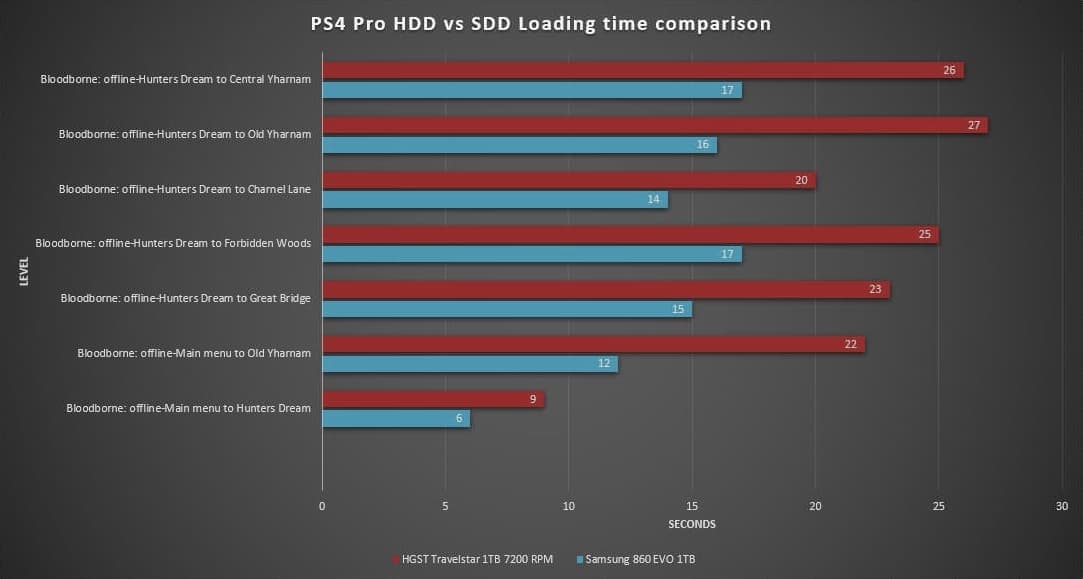
A SATA SSD is the most common upgrade for gamers still on a 7200 RPM HDD. Though limited to ~550 MB/s, that’s 4‑5× faster than a typical HDD and an order of magnitude quicker in random access. Installation is simple—drop a 2.5‑inch drive into an empty bay and connect SATA and power cables. You’ll see dramatically shorter boot times, faster level transitions, and near‑instant game launches. The downside is that you won’t hit the blistering speeds of NVMe.
Best for: Mid‑range builds, budget‑conscious gamers, or laptops that only expose SATA ports.
Shop this type: Check price on Amazon →
High‑capacity HDD – “Mass storage for huge game libraries”
Even in 2026 many gamers amass dozens of terabytes—especially those who run DRM‑free titles, emulators, or use their PC as a media server. A 4 TB or 8 TB 7200 RPM HDD offers the most storage for the least money per gigabyte. Load times will be slower than any SSD, but the capacity advantage is undeniable. Modern HDDs may use Shingled Magnetic Recording (SMR) for higher density, though SMR can hurt write‑heavy workloads such as daily large patch installs.
Best for: Users with massive collections, secondary “archive” drives, or anyone who keeps older titles that rarely update.
Shop this type: Check price on Amazon →
Hybrid SSHD – “A compromise between speed and space”
Hybrid drives pair a small (8‑32 GB) NAND cache with a traditional 7200 RPM platter. Frequently accessed data—like game launch files—resides in the cache, delivering SSD‑like load times for your most‑played titles while retaining 2‑4 TB of affordable capacity. Performance drops once the cache fills or for random accesses beyond the cached area.
Best for: Budget gamers who want a noticeable bump over an HDD but cannot afford a separate SSD, or console owners with limited internal upgrade options.
Shop this type: Check price on Amazon →
External USB‑C SSD – “Portable speed for laptops and consoles”
If you game on a laptop, a console that supports external storage, or simply need a fast removable solution, an external USB‑C SSD is the answer. With USB 3.2 Gen 2x2 bandwidth (up to 20 Gb/s), these drives approach internal SATA speeds, and Thunderbolt‑compatible enclosures can push NVMe performance even higher. They’re plug‑and‑play, require no internal installation, and keep your system tidy. The caveat is a higher price per gigabyte and the risk of physical damage if dropped.
Best for: Mobile gamers, console owners (e.g., PS5 or Xbox Series X) needing extra fast storage for newer titles, or anyone who wants to carry a full game library on the go.
Shop this type: Check price on Amazon →
How to choose
- Identify your primary need – speed, capacity, or flexibility. If you crave the fastest load times, prioritize an NVMe PCIe SSD and ensure your motherboard has an M.2 slot supporting at least PCIe 3.0 x4 (PCIe 4.0 for future‑proofing, PCIe 5.0 if you’re building a cutting‑edge rig).
- Create a hybrid storage tier – keep the OS and your most‑played titles on the SSD; offload large libraries, recordings, and rarely‑played games to a high‑capacity HDD or SSHD.
- Match form factor to chassis – M.2 2280 for desktops, 2.5‑inch for laptops and compact builds. If you opt for an external solution, verify that the console or laptop supports the required USB‑C protocol.
- Plan for cooling – NVMe drives with integrated heat sinks perform best when mounted near a case vent. Some aftermarket heatsinks are inexpensive and worth the extra stability.
- Check endurance and warranty – modern consumer SSDs ship with 5‑year warranties and TBW ratings well above typical gaming write volumes. HDDs should have at least a 2‑year warranty and be from a reputable manufacturer.
- Future‑proofing tip – If you anticipate upgrading to PCIe 5.0 or adopting next‑gen consoles, buying a 2 TB NVMe now leaves room for larger game installs and prevents early bottlenecks.
By mapping these factors, you can assemble a storage solution that trims loading screens without inflating your budget.
FAQ
What’s the real‑world loading‑time difference between an SSD and an HDD?
On modern games, an HDD can take 30‑60 seconds to load a large open‑world area, a SATA SSD reduces that to 10‑20 seconds, and an NVMe SSD can shave it further to 5‑10 seconds. Exact numbers vary by engine, but SSDs consistently cut wait times.
Can I install an NVMe SSD on an older motherboard that only has SATA ports?
No. NVMe drives require an M.2 slot that connects to PCIe lanes. If the board lacks such a slot, you need an adapter card, but performance will still be limited by the PCIe version the motherboard supports.
Are hybrid SSHDs worth it in 2026?
They provide a modest middle ground for tight budgets. If you can afford at least a 500 GB SATA SSD, you’ll see a clearer improvement. SSHDs become attractive only when you need many terabytes on a very limited budget.
Do external SSDs affect game performance on consoles?
Yes, but only if the console treats the external drive as “internal” storage (e.g., PS5’s USB‑C SSD expansion). When used merely for media or backup, games still load from the internal SSD.
How much SSD storage do most gamers actually need?
A typical AAA title occupies 70‑150 GB. Three to four active games plus the OS fit comfortably on a 1 TB SSD. If you rotate titles often, a 2 TB SSD offers breathing room; otherwise, combine a 500 GB SSD with a larger HDD for a cost‑effective setup.
Bottom line
SSD storage—especially NVMe PCIe models—outpaces HDDs by a wide margin, shrinking load times from minutes to seconds. Pair a fast SSD for your OS and favorite titles with a high‑capacity HDD for archives, or choose a SATA SSD if budget constraints apply. For portable rigs, an external USB‑C SSD delivers comparable speed without opening the machine. Select the drive that balances speed, capacity, and cost for your gaming routine, and you’ll feel the difference the moment you press “Start”.