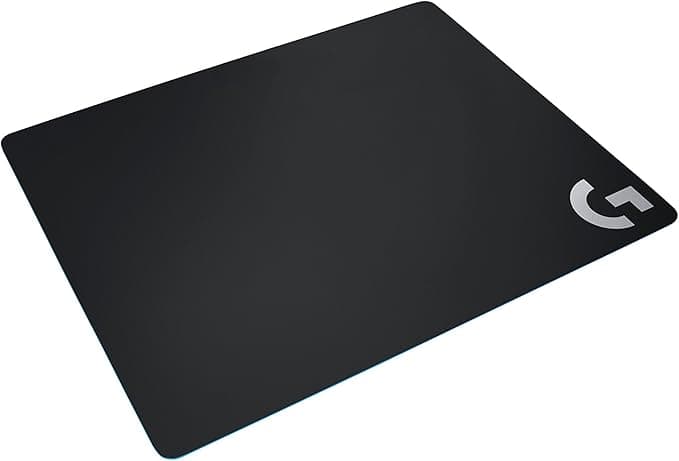
The Best High‑Performance Mouse Pad for Low‑DPI Gamers – A Pro’s Buying Guide
Low‑DPI gamers need a surface that translates tiny hand movements into reliable on‑screen actions. If you spin at 400–800 DPI and experience “stutter” or “jitter” on cheap cloth pads, the problem isn’t your mouse—it’s the pad. This guide pinpoints the attributes that matter, walks you through the main use‑case categories, and presents the top‑performing pads in each bucket. By the end you’ll know how to read surface texture, pick the right size, and balance speed versus control.
Quick picks
- Full‑size cloth pad with micro‑textured surface – Balanced “medium‑fast” glide, generous work area.
- Low‑profile hard polycarbonate pad – Ultra‑precise tracking with minimal surface deformation.
- Hybrid gel‑filled pad – Wrist support without sacrificing glide.
- Oversized low‑friction glass or aluminum pad – Premium durability for workstation rigs.
- Portable thin travel pad – Ideal for LAN parties or tournaments.
What to look for
Surface material & texture
The mouse sensor and pad’s top layer must work together flawlessly. Cloth surfaces can be tuned from rough to smooth; a fine micro‑textured weave offers just enough resistance to keep a low‑DPI sensor steady while still allowing smooth sweeps. Hard surfaces—polycarbonate, glass, aluminum—provide a near‑frictionless glide that many low‑DPI players prefer because the sensor reads each micro‑movement without “catch‑up” delay. Look for a consistent finish across the entire area and avoid pads that show wear after a few weeks of heavy use.
Thickness & rigidity
A pad that’s too soft compresses under rapid flicks, shifting the sensor’s angle and creating jitter. Conversely, an overly rigid pad can feel harsh on the wrist during long sessions. Most high‑performance pads sit between 2 mm and 4 mm: thin enough to stay stable, thick enough to cushion the wrist. If you already have wrist pain, choose a pad that combines a thin hard top with a softer backing layer.
Size & shape
Low‑DPI gamers make large sweeping motions, so a full‑size (≈350 mm × 300 mm) or oversized (up to 400 mm × 350 mm) pad prevents the mouse from rolling off the edge. If desk space is limited, a narrower “gaming strip” (≈250 mm wide) can still work, as long as the length accommodates your movement style. Pay attention to edge finish—stitched or beveled edges stop fraying and keep the usable area consistent.
Edge stitching & durability
Dust and debris enter through seams. Double‑stitched or heat‑sealed edges keep the backing from separating and maintain a flat surface over time. Look for terms like “anti‑fray” or “reinforced edges,” especially on cloth models that tend to unravel after months of heavy dragging.
Compatibility with sensor technology
Modern optical and laser sensors are forgiving, but low‑DPI settings still demand a surface that doesn’t “mirror” the sensor’s light pattern. Pads marketed as sensor‑agnostic or tested with brands such as Logitech, Razer, and SteelSeries give confidence that your mouse will track accurately. If you know your mouse uses a specific sensor (e.g., PMW3366), check the pad’s compatibility list.
Maintenance & cleaning
A pad that traps grime gradually degrades sensor performance. Water‑resistant surfaces that can be wiped with a damp cloth are a must. Some high‑end cloth pads are machine‑washable; ensure the product explicitly mentions “washable” rather than “spot‑clean only.” Easy maintenance preserves a consistent feel, which is crucial for low‑DPI precision.
Additional considerations
- Weight – Heavier pads (glass, metal) stay put on flimsy desks but can feel cumbersome to move.
- Noise – Hard surfaces can produce a clicking sound when the mouse’s feet hit them. If you stream or play in a quiet environment, a cloth or gel pad may be preferable.
- Aesthetics – Matte vs. glossy finishes affect both visual appeal and perceived glare; choose what fits your rig’s style.
Our picks
Full‑size cloth pad with micro‑textured surface
A classic cloth pad remains the most versatile choice for low‑DPI gamers who want a blend of control and comfort. The micro‑textured weave adds a subtle “grip” that prevents the sensor from skidding during tiny adjustments, while still offering a smooth glide for fast sweeps. Its thickness absorbs wrist fatigue, making it a solid pick for marathon sessions on a full‑size desk.
Who it’s for: Players who value a large working area, moderate wrist support, and a surface that can be fine‑tuned with a light brush.
Trade‑offs: Cloth pads can wear unevenly, especially if you habitually slide the mouse to the same spot. They also need periodic cleaning to keep dust from building up under the fibers.
Shop this type: Check price on Amazon →
Low‑profile hard polycarbonate pad
Hard polycarbonate provides a near‑frictionless surface that lets low‑DPI sensors track every sub‑pixel movement. Its rigidity ensures the pad never “bottoms out,” eliminating jitter you sometimes feel on softer mats during rapid flicks. Because the pad is thin (often under 2 mm), it sits flush with the desk, giving a stable base for mouse pads that have built‑in rigid frames.
Who it’s for: Precision‑focused players who want the fastest possible glide and have a mouse that pairs well with low‑friction surfaces.
Trade‑offs: The hard surface can feel harsh on the wrist after hours of play, and it shows fingerprints, so frequent cleaning is required.
Shop this type: Check price on Amazon →
Hybrid gel‑filled pad
Hybrid pads sandwich a thin layer of gel between a cloth top and a rubber base. The gel distributes pressure evenly, giving a “floating” feel that reduces wrist strain without sacrificing glide. The cloth top is usually engineered with a medium‑rough texture, which works well for low‑DPI sensors that need a touch of resistance to stay steady.
Who it’s for: Gamers who want a mix of comfort and control—especially those with wrist fatigue or long‑hour sessions.
Trade‑offs: Hybrid pads tend to be heavier, which can make them feel “wobbly” if your desk isn’t sturdy. The gel can degrade over several years, so you might replace the pad sooner than a plain cloth or hard pad.
Shop this type: Check price on Amazon →
Oversized low‑friction glass or aluminum pad
Glass and liquid‑metal (often aluminum‑alloy) pads deliver ultimate durability and an ultra‑smooth glide. Their low‑friction nature is perfect for low‑DPI gamers who want a predictable, almost “zero‑drag” experience. Because the material is rigid, the pad never warps and resists spills and stains effortlessly. The oversized format (often 400 mm × 350 mm or larger) guarantees you never run out of room for large arm sweeps.
Who it’s for: Players with a dedicated gaming station, plenty of desk space, and a preference for a sleek, premium aesthetic.
Trade‑offs: Glass is unforgiving on wrists, and hard metal can be noisy when the mouse’s feet hit it. Both are heavier and can crack (glass) or dent (aluminum) if dropped.
Shop this type: Check price on Amazon →
How to choose
- Map your desk layout – Measure the available surface. Full‑size or oversized pads suit expansive rigs; low‑profile or travel pads fit cramped setups.
- Identify your movement style – Wide, sweeping motions need a larger pad. Precise, compact flicks can work on a smaller strip.
- Determine wrist support needs – Existing wrist pain points you toward hybrid gel or thicker cloth pads. If you chase the fastest glide, a hard polycarbonate or glass pad is ideal.
- Check sensor compatibility – Low‑DPI gamers usually run CMOS or PMW sensors. A micro‑textured cloth or finely sanded hard surface provides the micro‑resistance these sensors love.
- Plan maintenance – Cloth pads require regular spot‑cleaning or washing; hard surfaces need quick wipes; hybrid pads may need occasional gel checks.
- Consider weight and noise – Heavy glass/aluminum adds stability but can be noisy; lighter cloth pads are silent but may shift on slick desks.
Balancing these factors—size, surface, thickness, ergonomics, and upkeep—narrows the field to the pad that matches your performance goals and comfort requirements.
FAQ
What surface texture is best for a 400‑DPI mouse?
A medium‑to‑slightly‑rough micro‑textured surface gives enough resistance to keep the sensor stable while still allowing smooth sweeps. Cloth or lightly sanded hard pads work well.
Will a glass mouse pad damage my mouse sensor?
No. Modern optical and laser sensors are designed to work on glass. Just keep the surface clean and free of dust.
How often should I clean my gaming mouse pad?
- Cloth pads: Spot‑clean weekly; full wash (if allowed) once a month.
- Hard surfaces: Wipe with a damp microfiber cloth after each session.
Do I need a specific pad size for low‑DPI gaming?
Size isn’t a hard rule, but a larger pad prevents the mouse from rolling off during big arm movements common in low‑DPI setups.
Can a too‑thin pad cause jitter at low DPI?
Yes. Thin pads compress under fast motions, subtly shifting the sensor angle and creating jitter. Aim for at least 2 mm thickness for stability.
Are stitched edges really necessary?
Stitched or heat‑sealed edges stop fraying and keep the surface flat, preserving consistent tracking—a must‑have for low‑DPI precision.
Is a hybrid gel pad worth the extra cost?
If you experience wrist fatigue during long sessions, the added comfort can improve accuracy and reduce strain, making the higher price a worthwhile investment.
How does pad weight affect gameplay?
Heavier pads (glass, metal) stay put on flimsy desks, reducing unwanted movement. Lighter pads are easier to relocate but may shift under aggressive taps.
Bottom line
Choosing the right mouse pad for low‑DPI gaming hinges on three decisions: surface texture, size, and ergonomics. A micro‑textured full‑size cloth pad offers balanced glide and wrist comfort, while a hard polycarbonate pad delivers the fastest, most predictable tracking for pure precision. Hybrid gel‑filled pads bridge the gap with added support, and oversized glass or aluminum pads provide unmatched durability for dedicated rigs. Evaluate your desk space, movement style, and comfort needs, then pick the pad that aligns—your low‑DPI mouse will thank you with smoother, more accurate gameplay.