How to Select the Best Gaming Mouse Grip Style
When you sit down for a gaming session, the way your hand rests on the mouse can turn fluid victories into cramped fatigue. Most gamers know their preference—palm, claw, or fingertip—but turning that feeling into a purchase often feels overwhelming. Endless specs, weight‑reduction claims, and sensor hype make it hard to see which factor truly matters for your grip.
This guide walks you step‑by‑step through the decision‑making process. We break down mouse anatomy, highlight the specs that influence comfort, and match each grip style with the mouse that lets you play at your best. By the end you’ll know exactly what to look for, which categories fit your hand, and how to narrow the field without drowning in marketing jargon.
Quick picks
- Palm‑friendly ergonomic shape – generous palm support, slightly heavier, rounded back.
- Claw‑oriented lightweight chassis – sculpted curves, removable weights, low‑profile silhouette.
- Fingertip‑focused ultra‑compact mouse – minimal surface area, very light, pronounced scoop.
- Hybrid‑adjustable mouse – interchangeable side grips or tunable weight system for multiple styles.
What to look for
Sensor & DPI range
A quality sensor (optical or laser) determines how accurately the cursor follows your hand. Look for a minimum of 1,000 dpi; competitive players usually stay between 4,000–8,000 dpi. More important than raw dpi is tracking precision and acceleration‑free performance – seek “zero acceleration” or “native 1:1 tracking.”
Weight & balance
Weight dictates the inertia you feel when you start, stop, or change direction. Palm players typically enjoy 90–110 g, claw players 70–85 g, and fingertip users under 70 g. Removable‑weight systems let you fine‑tune balance without buying a new model.
Shape & ergonomics
The silhouette is the biggest determinant of grip comfort.
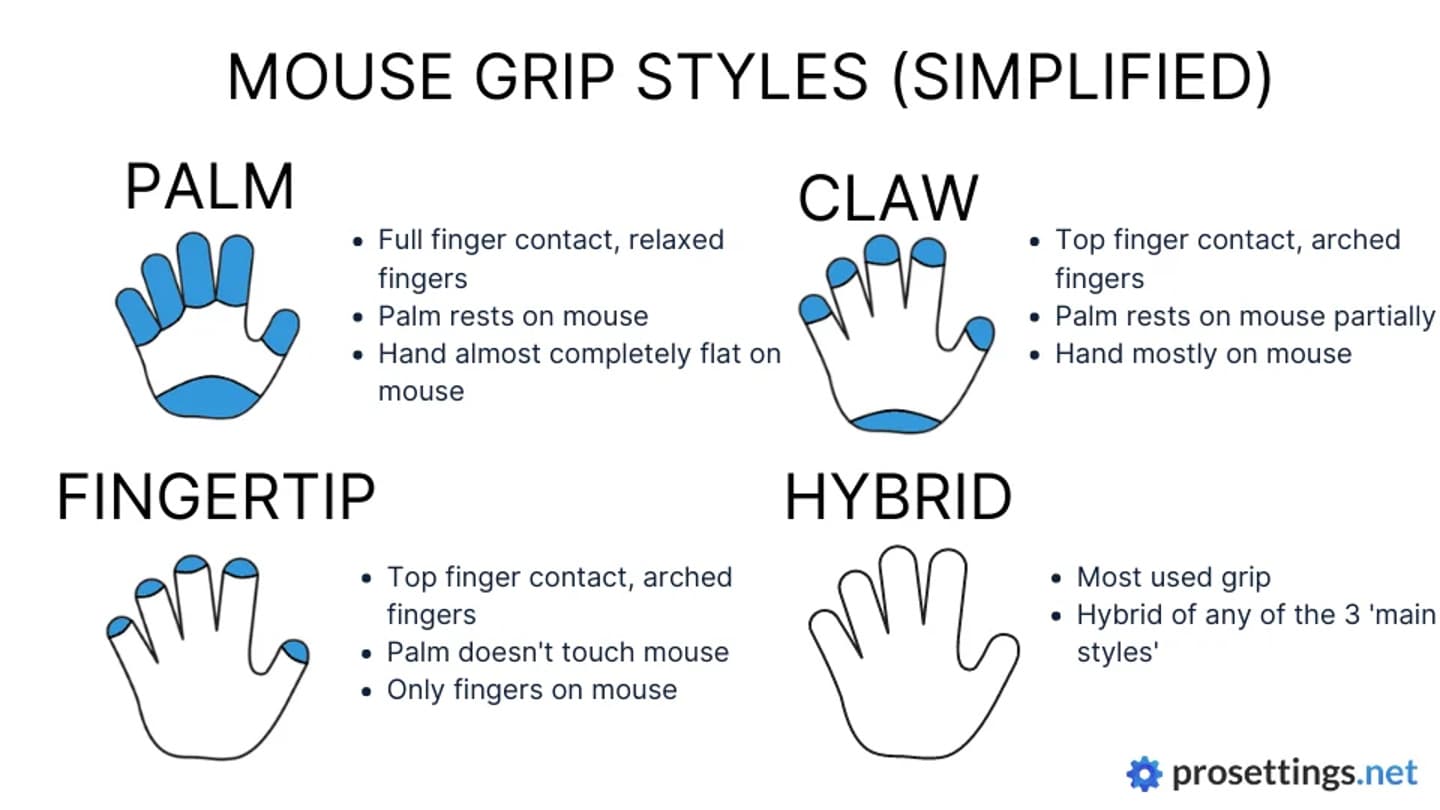
- Full‑palm: deep backplate, wide thumb ridge, gentle slope that cradles the hand.
- Claw: tapered front, pronounced angle for the fingers with a modest palm rest.
- Fingertip: short, scooped front that lets only the tips hover over the sensor. Look for 3‑D product views or demo units in‑store.
Button layout & programmability
Beyond left‑ and right‑click, most gaming mice add side buttons, a DPI button, and sometimes a scroll‑mode switch.
- Palm users need side buttons reachable without thumb stretch.
- Claw players benefit from a recessed cluster pressable with the index finger.
- Fingertip gamers prefer a slim side‑button profile. On‑board memory for macros eliminates reliance on software.
Grip texture & materials
Surface finish affects feel and sweat management.
- Soft‑touch rubber reduces slippage for palm users.
- Matte micro‑grain gives tactile bite for claw players.
- Hybrid finishes (smooth top, textured ramps) keep fingertip contact points from slipping. Consider a removable silicone grip sleeve for interchangeable texture.
Our picks
Palm‑friendly ergonomic mouse
If you spend most of your session with the whole hand resting on the mouse, an ergonomic shape that fills the palm is essential. Look for a rounded back, generous thumb rest, and 90–110 g weight. These models usually pair a larger sensor with accuracy across a broader surface.
Who it’s for
- MMO or RTS players who play for hours.
- Gamers with larger hands (palm width > 9 cm).
Trade‑offs
- Larger footprint can feel cumbersome on a cramped desk.
- Slightly heavier weight may hinder ultra‑fast flicks, though many accept the trade‑off for comfort.
Shop this type: Check price on Amazon →
Claw‑oriented lightweight mouse
For a style that balances palm support with a pronounced finger angle, choose a mouse that tapers toward the front and includes removable weights. Target weight is 70–85 g, with a sculpted side ridge for natural thumb rest and index‑finger claw.
Who it’s for
- FPS enthusiasts who need rapid, precise movements.
- Medium‑sized hands (palm width 8–9 cm) seeking stability and agility.
Trade‑offs
- Reduced palm surface means less overall support; some may feel wrist fatigue sooner.
- Removable‑weight mechanisms add internal complexity, which can affect long‑term durability.
Shop this type: Check price on Amazon →
Fingertip‑focused ultra‑compact mouse
When you prefer to hover only the tips of your fingers over the sensor, an ultra‑compact mouse with a pronounced scoop delivers the answer. These models weigh under 70 g and measure about 10 cm in length, forcing a fingertip posture. The sensor sits toward the front, ensuring even the smallest hand movements translate accurately.
Who it’s for
- Pro‑level FPS or MOBA players who rely on rapid flicks and minimal hand travel.
- Gamers with smaller hands (palm width < 8 cm) who find larger mice cramped.
Trade‑offs
- Minimal palm support can cause strain during marathon sessions; regular breaks are essential.
- Compact size may limit side‑button count, so heavy macro users need on‑board programming.
Shop this type: Check price on Amazon →
How to choose
- Identify your natural grip – Place your hand on a generic mouse. If the whole palm rests flat, you’re a palm player; if only the finger bases touch while the palm hovers, you’re a fingertip player; if the fingers curve over a shallow cup, you’re a claw player.
- Measure your hand – Use a ruler across the widest part of your palm and from knuckle to fingertip. Match those dimensions to the mouse’s length, width, and height (usually listed in millimetres). Aim for about a centimetre of clearance on each side when you adopt your natural grip.
- Consider your game genre – Fast‑paced shooters benefit from a lighter, more responsive mouse; strategy or RPG titles reward weight and ergonomic support.
- Test before you buy – Many retailers let you try a demo unit; online stores often provide a 30‑day return window. Play for at least an hour; initial comfort can turn into fatigue if weight distribution isn’t right.
Following these steps—grip type, hand size, game style—you’ll narrow the field to a handful of models that truly match your needs, instead of being swayed by marketing hype.
FAQ
What’s the difference between DPI and CPI?
DPI (dots per inch) and CPI (counts per inch) describe how many sensor counts are reported for each inch of mouse movement. Higher numbers move the cursor farther for the same physical motion.
Can I change my grip style later without buying a new mouse?
Some mice offer interchangeable side grips or removable weight modules that let you shift between palm, claw, or fingertip feels. The core shape still limits the range of comfortable grips, so dedicated mice often feel better.
Does a higher sensor resolution guarantee better performance?
Not necessarily. Accuracy, acceleration‑free tracking, and low latency matter more than raw resolution. A 4,000 dpi sensor with zero acceleration feels smoother than an 8,000 dpi sensor that wobbles.
How important is the polling rate?
Polling rate (Hz) tells how often the mouse reports its position. Competitive gamers often use 1,000 Hz (1 ms) for maximum responsiveness, but the jump from 500 Hz to 1,000 Hz is subtle for most players.
Should I prioritize wired or wireless for grip comfort?
Both can be comfortable; latency is the key factor. Modern wireless mice with a 2.4 GHz dongle or Bluetooth 5.0 can match wired latency. Choose wired for zero‑delay assurance, wireless for a clutter‑free setup.
Are removable weights worth the extra cost?
If you like to experiment with different grip styles or fine‑tune balance for specific games, removable weights add flexibility. For a single, consistent grip, a fixed‑weight mouse is simpler and often more durable.
How often should I replace my gaming mouse?
A well‑built mouse lasts 3–5 years with regular cleaning. Replace it when the sensor misreads surfaces, buttons become unresponsive, or persistent hand fatigue suggests a shape mismatch.
Bottom line
Choosing the right gaming mouse grip style is less about headline specs and more about matching shape, weight, and texture to your natural hand posture and preferred game genre. Identify whether you’re a palm, claw, or fingertip player, measure your hand, and target sensor accuracy, weight distribution, and button placement that complement that grip. With the three categories outlined—ergonomic palm, lightweight claw, and ultra‑compact fingertip—you can focus your search on models that truly feel right, cutting trial‑and‑error and letting you game comfortably for hours. Happy hunting!