Best Ergonomic Chair for Marathon Gaming Sessions
You’ve been grinding raiding bosses, streaming for hours, and feeling that nagging lower‑back ache by the end of the night. The problem isn’t your skill—it’s the seat you’re stuck in. A chair that supports your spine, promotes circulation, and adapts to your posture can turn a painful marathon into a comfortable victory. This guide pinpoints the must‑have features, breaks down the main chair families, and gives you a step‑by‑step method for picking the ideal throne.
Quick picks
- High‑back racing‑style chair – Cockpit feel, strong lumbar support, adjustable tilt.
- Adjustable executive chair – Full‑body adjustability, professional look, high back.
- Compact ergonomic office chair – Core comfort, minimal footprint.
- Reclining lounge chair with built‑in footrest – Ideal for relaxed gaming or streaming.
- Modular standing‑to‑seating hybrid – Switch between sit and stand without leaving your rig.
What to look for
3‑D Adjustable Armrests
Armrests that move forward/back, up/down, side‑to‑side, and swivel let you align elbows with desk height, keeping shoulders relaxed and avoiding nerve compression.
Lumbar and Thoracic Support
A built‑in lumbar curve (or attachable pad) preserves the spine’s natural S‑shape. Adjustable thoracic pads add upper‑back support for forward‑leaning aim.
Seat Depth and Tilt Angle
Aim for a 2–3‑inch gap between the back of your knees and the seat edge. Multi‑position tilt mechanisms (90°, 110°, 130°) let you recline for breaks while staying supported.
Material Breathability
High‑density foam paired with mesh or perforated PU leather dissipates heat. If you sweat during intense sessions, prioritize a ventilated backrest and seat cover.
Weight Capacity and Base Stability
A five‑star aluminum or reinforced‑polymer base prevents wobble. Mid‑range chairs handle ~250 lb; premium models reach 300 lb or more, indicating a sturdier frame.
Backrest Tension Adjustability
A tension knob controls resistance when you recline. Larger users or those who sit upright need higher tension to keep the chair from collapsing.
Noise and Durability of Mechanisms
Creaking casters or squeaky tilt levers become intolerable after hours. Look for nylon casters for carpet, polycarbonate wheels for hardwood, and reinforced steel pivots.
Cable Management & Accessories
Integrated cable‑gates or Velcro straps keep power cords and headset wires out of the way, preventing tripping hazards during fast‑paced play.
Our picks
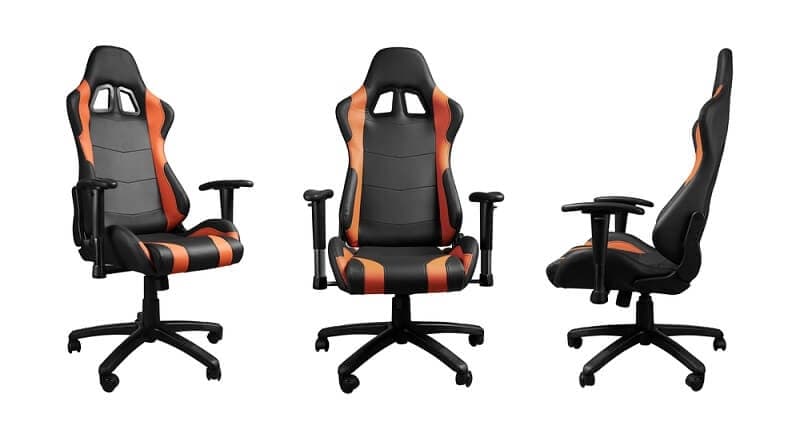
High‑Back Racing‑Style Chair
The racing silhouette mimics a car cockpit, offering a tall back that wraps the spine. Deep lumbar cushions, a headrest pillow, and a multi‑tilt mechanism that locks near‑flat for short rests are standard. The main trade‑off is a larger footprint; ensure at least 30 inches behind the backrest. Shop this type: Check price on Amazon →
Adjustable Executive Chair
Executive chairs focus on total adjustability and a polished aesthetic—think leather‑look upholstery and metal accents. Independent tuning of seat height, depth, armrests, and tension accommodates a wide range of body types. Built‑in lumbar support moves up and down to maintain posture during tactical planning. The design blends into a home office better than a racing chair. Shop this type: Check price on Amazon →
Compact Ergonomic Office Chair
Perfect for shared bedrooms or modest desks, this chair offers core comfort without a massive chassis. Look for a mesh back, moderate seat contour, and 3‑D armrests that slide out of the way. A synchro‑tilt system tilts seat and back together, mirroring natural spinal movement. Expect a lower price point and less plush padding—ideal for light‑to‑moderate gaming mixed with office work. Shop this type: Check price on Amazon →
Reclining Lounge Chair with Built‑in Footrest
When a story‑driven marathon or a relaxed stream calls for leaning back, a lounge‑style chair that reclines to 150°–180° and includes an extendable footrest keeps you comfortable while keeping hands on the controller. Choose a model with lockable recline positions to avoid unexpected flopping. You’ll need a lower desk or a separate controller stand for optimal reach. Shop this type: Check price on Amazon →
Modular Standing‑to‑Seating Hybrid
Ergonomic research recommends alternating sit‑stand to boost circulation. This hybrid combines a height‑adjustable seat with a standing platform that slides under the tabletop when raised. The platform holds keyboard and mouse at ergonomic heights, letting you break up six‑hour sessions with brief standing intervals. The downside is a higher upfront cost and more complex assembly. Shop this type: Check price on Amazon →
How to choose
- Measure your space. Racing chairs need ~30 inches of clearance behind the backrest; compact chairs fit into a 20‑inch zone.
- Match the chair to your body. Tall users (>6’2”) benefit from high‑back or executive chairs with adjustable headrests. Shorter players may prefer low‑profile lounge or compact models.
- Identify your primary posture. Forward‑leaning FPS gamers should prioritize firm lumbar support and a forward tilt (~110°). RPG or streaming players who recline need lockable recline and footrest options.
- Set a budget and prioritize durability. Steel frames, high‑density foam, and reinforced casters usually last 5–7 years under daily use. If funds are limited, focus on breathable mesh, robust tilt mechanisms, and replaceable cushions.
- Test before you buy. If possible, sit in the chair for a few minutes, adjust all controls, and check for squeaks or wobble. A quick in‑store trial can reveal comfort issues that specs hide.
By aligning room size, body shape, preferred posture, and price with the categories above, you’ll secure a seat that turns marathon gaming from an endurance test into a comfortable experience.
FAQ
What is the ideal chair height for a typical gaming desk?
Set the seat so elbows form roughly a 90° angle when forearms rest on the desk. This generally means 16‑20 inches from floor to seat, adjusted for desk thickness and leg length.
Do I really need a headrest pillow?
A headrest keeps the neck neutral when you recline. If you often lean back during breaks, a pillow reduces neck strain; otherwise, a well‑shaped backrest may suffice.
How often should I replace the cushions in my gaming chair?
High‑density foam retains shape for 3‑4 years under daily use. Replace cushions when you notice sagging or loss of lumbar support.
Are “racing” chairs actually better for posture than regular office chairs?
Racing chairs combine strong lumbar support with a higher back, which helps forward‑leaning gamers. A fully adjustable office chair can provide equal support if tuned correctly.
Will a mesh back keep me cooler during intense gaming sessions?
Yes. Mesh panels promote airflow and shed heat faster than solid leather or PU finishes, keeping you comfortable for longer periods.
How much weight can a typical ergonomic gaming chair support?
Mid‑range models support up to 250 lb; premium chairs often rate for 300 lb or more. Always check the manufacturer’s specifications.
Can I use a gaming chair for work‑from‑home tasks?
Absolutely. Most ergonomic gaming chairs are built for long sitting periods, making them suitable for both play and professional work.
Bottom line
The best ergonomic chair for marathon gaming isn’t the flashiest design; it’s the one that matches your space, body, posture, and budget. Whether you gravitate toward a high‑back racing seat, a sleek executive model, a space‑saving compact chair, a reclining lounge, or a sit‑to‑stand hybrid, the right chair aligns your spine, sustains circulation, and keeps focus sharp during epic play‑throughs. Use the criteria and categories in this guide, test adjustments in‑store if possible, and treat a quality chair as an investment in performance and long‑term health. Happy gaming!