What Is Jitter in DACs and Why It Matters
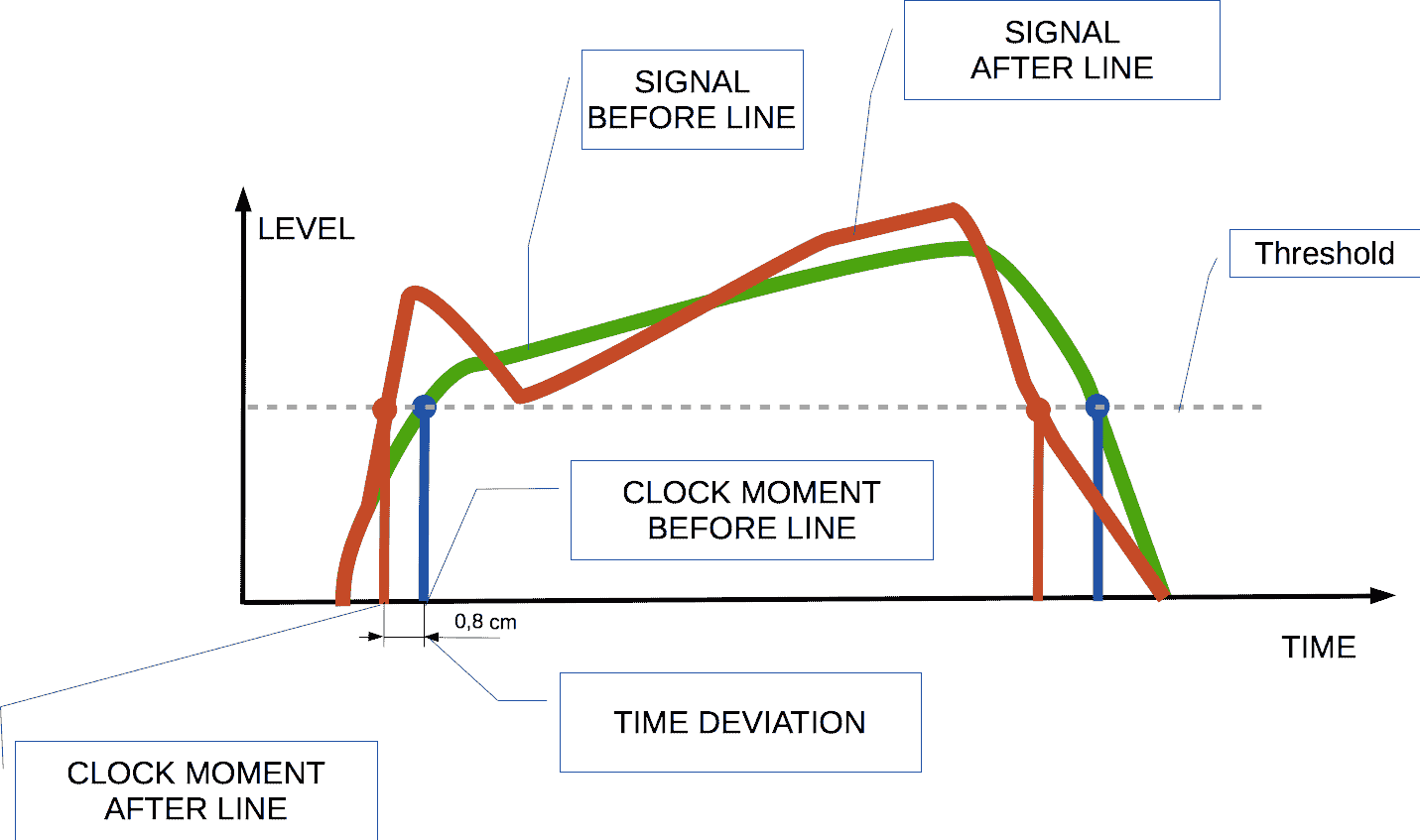
If you’ve spent a premium on a DAC only to hear dull transients, lack of imaging, or a “smudged” soundstage, the culprit is often jitter – tiny timing errors that blur the digital‑to‑analog conversion. Jitter is the deviation, measured in picoseconds, between when a digital sample should arrive and when it actually does. Even though the ear can’t hear a 100‑ps slip directly, the cumulative effect can erase the finest details of a recording.
This guide explains jitter, shows how manufacturers disclose it, and gives you concrete criteria for selecting a DAC that preserves every nuance of your music.
Quick picks
- Portable USB‑bus‑powered DACs – Perfect for laptop or smartphone listening. Look for asynchronous USB and a built‑in reclocking circuit.
- Desktop DACs with external power bricks – Ideal for a dedicated listening room where clean power matters.
- Network‑streaming DACs (network players) – Best for multi‑room or high‑resolution streaming from a NAS, Tidal, or similar service.
- Hybrid DAC/amp combos – The go‑to solution for demanding headphones that need both low‑jitter conversion and ample drive.
What to look for
Jitter Measurement (picoseconds)
Manufacturers sometimes list "USB clock jitter," "AES/EBU jitter," or "SPDIF jitter" in picoseconds (ps). Lower numbers mean tighter timing. If the spec is missing, seek independent measurements using an oscilloscope or specialized audio‑lab gear.
Clock Quality and Reclocking
A high‑stability crystal oscillator is the heart of any DAC. Features such as asynchronous USB, reclocking circuits, or a master clock actively clean the incoming stream before conversion. Prioritize models that let the DAC set its own clock rather than relying on the computer’s noisy source.
Power‑Supply Design
Power‑rail ripple injects jitter into the analog stage. Look for linear regulators, low‑noise switching supplies, or separate analog/digital rails. Models that accept an external power brick or provide dual‑rail designs usually deliver the cleanest voltage.
Connectivity and Cable Quality
AES/EBU (XLR) and coaxial SPDIF carry a more stable clock reference than USB, but a well‑implemented asynchronous USB DAC can rival or beat them. Choose shielded, low‑capacitance cables—gold‑plated connectors are a good proxy for attention to signal integrity.
Digital Filter and Oversampling
Oversampling smooths conversion, but steep filters can mask jitter while altering the soundstage. Units that let you switch filter slopes (e.g., 64 kHz, 128 kHz) or enable a "Jitter‑free" mode give you control over the trade‑off between timing purity and tonal character.
Latency and Real‑Time Performance
Latency below 10 ms is a practical benchmark for gaming, video editing, or live streaming. Low latency often correlates with a well‑controlled internal clock, which in turn reduces jitter.
Firmware Updates & Temperature Stability
Manufacturers that release regular firmware updates can refine clock algorithms after launch. Additionally, DACs with thermally insulated chassis maintain consistent oscillator performance across temperature swings.
Our picks
Compact USB‑bus‑powered DAC (for laptops and phones)
A pocket‑sized unit that supports asynchronous USB and includes a reclocking circuit delivers clean conversion without extra bulk. Linear regulation keeps the internal rail steady, which is essential for high‑impedance IEMs.
Shop this type: Check price on Amazon →
High‑performance desktop DAC with external power brick
A rack‑mountable DAC with AES/EBU, coaxial, and asynchronous USB inputs, plus a selectable digital filter, maximizes timing precision. The external brick isolates the converter from noisy PC supplies, yielding lower jitter in both bass transients and high‑frequency detail.
Shop this type: Check price on Amazon →
Network‑streaming DAC (multi‑room Hi‑Res playback)
A network player that handles Wi‑Fi, Ethernet, and DLNA/UPnP streams typically incorporates a high‑precision crystal clock for both network and analog stages. Look for optional reclocking and asynchronous USB outputs to feed an external amp.
Shop this type: Check price on Amazon →
Hybrid DAC/amp combo (demanding headphones)
For planar magnetic or high‑impedance dynamic drivers, a hybrid unit merges a low‑jitter DAC front end with a high‑current headphone amp. Balanced (4‑wire) outputs and asynchronous USB/AES inputs keep the signal path short and timing tight.
Shop this type: Check price on Amazon →
How to choose
- Define the listening scenario – Portable use → asynchronous USB bus DAC. Fixed‑room use → external‑powered desktop DAC. Multi‑room streaming → network player. High‑impedance headphones → hybrid DAC/amp.
- Check clock architecture – Look for crystal oscillators, reclocking, and asynchronous modes. When numbers are absent, trust reputable review sites that have measured jitter.
- Evaluate power design – Linear regulators and external bricks win over noisy switching rails.
- Match connectivity to source – If most of your music lives on a computer, prioritize USB asynchronous. If you use a media server, AES/EBU or coaxial inputs become more important.
- Consider future upgrades – Models with firmware‑update pathways can improve clock algorithms without hardware changes.
- Listen critically – Use a reference track (e.g., a high‑resolution classical piece) and compare a low‑jitter DAC against a known baseline. Focus on transient clarity, imaging depth, and texture detail.
Balancing these factors will guide you to a DAC that delivers the timing accuracy your ears deserve without overspending on unnecessary specs.
FAQ
What exactly is jitter measured in?
Jitter is expressed in picoseconds (ps), representing the deviation from the ideal arrival time of each digital sample. Smaller numbers indicate tighter timing control.
Can I hear jitter with my ears alone?
The ear cannot detect a 100‑ps slip directly, but excessive jitter manifests as loss of detail, smeared transients, and a less precise soundstage.
Does a “low‑jitter” claim guarantee better sound?
Not always. Jitter is one factor; a noisy power supply or poor analog stage can negate a low‑jitter clock. Look for balanced engineering across clock, power, and analog sections.
Is asynchronous USB the same as “USB reclocking”?
Asynchronous USB lets the DAC control data timing, effectively acting as a reclocker. It is the most common method to reduce USB‑related jitter.
How does jitter affect streaming versus local playback?
Streaming adds network latency but does not inherently increase jitter if the DAC’s internal clock is stable. Local playback can introduce more jitter because a computer’s USB controller may have a less precise clock.
Do balanced (XLR) digital inputs reduce jitter?
Balanced AES/EBU inputs are less susceptible to interference and can carry a cleaner clock reference than unbalanced coaxial SPDIF, helping keep jitter low.
Should I prioritize jitter over THD+N?
Both matter but address different issues. Jitter impacts timing and transient accuracy; THD+N affects harmonic distortion. Ideally choose a DAC that excels at both, but for high‑resolution, detail‑critical music, jitter becomes a higher priority.
Bottom line
Jitter is the subtle timing error that can turn a pristine recording into a slightly dull experience. By focusing on clock quality, reclocking mechanisms, clean power design, and appropriate connectivity, you can select a DAC that preserves every nuance. Whether you need a pocket‑sized USB unit, a heavyweight desktop model, a network‑ready player, or a hybrid DAC/amp, the right choice hinges on low jitter, solid power, and thoughtful feature matching. Keep those criteria in mind and your audio chain will stay tight, accurate, and delightfully jitter‑free.