What to Consider When Buying a Headphone Stand
You’ve invested in high‑fidelity headphones, but every night they slip off the desk, get scratched, or you waste minutes hunting for a safe spot to rest them. A dedicated stand eliminates those headaches, protects your gear, and keeps your listening area tidy. This guide shows you which features matter, matches them to common listening setups, and presents curated picks so you can choose the ideal stand without endless scrolling.
Quick picks
- Compact desktop post – Ideal for a small desk or studio workspace where space is at a premium.
- Heavy‑duty floor column – Perfect for larger rooms or audiophile rigs that need extra stability for heavyweight over‑ear models.
- Multi‑device rack with headphone holder – Great if you want a single piece that supports headphones, DAC/amp, and maybe a turntable.
- Adjustable tilt/rotate stand – Suits users who frequently switch listening positions or need a visual cue for the “on‑air” look.
- Aesthetic wood or metal sculptural stand – For those who treat their gear as décor and want a piece that blends with high‑end interiors.
What to look for
1. Material and build quality
The stand’s material determines durability, weight, and vibration damping. Aluminum and steel posts are common because they handle heavy headphones (often 300 g or more) without bending. If you own delicate, lightweight models, acrylic or high‑density polymer can work, but watch for flex under load. Wood finishes (walnut, bamboo) add a warm aesthetic and naturally absorb minor vibrations, though they’re more prone to surface scratches. Look for solid‑welded joints or reinforced brackets—those are the hallmarks of a stand that will survive years of use.
2. Stability and weight capacity
A wobbling stand stresses the headband and can cause uneven wear. Check the advertised maximum load and compare it to the weight of your headphones (most manufacturers list it, or you can find community reports). Stands with a broad base or a weighted foot (steel plate or sand‑filled base) stay put even when you bump the desk. Floor‑standing columns need a sturdy “foot” that grips the floor; this is critical for pairs that exceed 500 g.
3. Footprint and adjustability
Your listening area dictates how much real‑estate you can allocate. A compact post may occupy only a few inches of desktop width, while a floor column can be 12–15 inches tall and require a clear floor spot. Adjustable height or tilt mechanisms are beneficial if you share a stand between open‑back and closed‑back models, which often have different optimal resting angles. Some designs let you rotate the headband 90° for easier access or to showcase a logo.
4. Cable management and extra features
A tidy setup reduces strain on the headphone cord. Look for built‑in cable clips, loops, or a recessed channel that guides the cord away from the base. Many modern stands incorporate USB hubs, Bluetooth receivers, or a small shelf for a DAC/amp. Extras add convenience but also complexity, so decide whether you truly need them or prefer a minimalist approach.
5. Aesthetic compatibility and finish
High‑end audio gear often lives in carefully curated spaces. Choose a finish that complements your desk or bookshelf—matte black for a modern studio, brushed aluminum for a sleek tech vibe, or natural wood for a classic listening lounge. Some manufacturers offer interchangeable tops or decorative caps, allowing you to swap styles without buying a new stand.
6. Price versus value
Headphone stands range from $20 for basic plastic posts to $150+ for premium sculptural pieces. Higher‑priced models justify the cost with superior materials, larger weight capacity, or integrated USB hubs. Focus on the features that matter to you; a $30 aluminum post can safely hold most audiophile headphones, while a $120 wooden sculpture may be worth it if visual impact is as important as function.
7. Maintenance and longevity
Regular dusting with a soft cloth keeps metal or wood looking fresh. For metal finishes, a mild soap‑water wipe followed by a dry microfiber prevents tarnish. Wood should be cleaned dry; avoid soaking or harsh chemicals. Periodically check the tightening screws on adjustable models to maintain rigidity.
Our picks
Compact desktop post – “The Space‑Saver”
If your desk is already crowded with a DAC, mixer, and a high‑resolution monitor, a low‑profile stand that barely sticks out is a lifesaver. Look for a slim aluminum column (about 1 inch in diameter) with a rubberized foot to keep it from sliding. This type works best for headphones that weigh under 400 g, such as many popular open‑back models. The trade‑off is that you won’t get additional shelves or cable routing; you’ll need to manage cords separately.
Why it suits you: Small‑room audiophiles, home‑studio engineers, or anyone who values a clean desktop without sacrificing stability.
Shop this type: Check price on Amazon →
Heavy‑duty floor column – “The Anchor”
For heavyweight over‑ear headphones—think large closed‑back models used in mastering or high‑end open‑back headphones that approach 500 g—nothing beats a floor‑standing column. Look for a steel or thick‑wall aluminum pole, a broad weighted base (often a steel plate of at least 8 inches square), and a top clamp that can be tightened without crushing delicate headband material. Many of these stands also include a small shelf for a DAC or a headphone amp, keeping your signal chain tidy.
Why it suits you: Larger listening rooms, audiophile rigs with multiple components, or anyone who moves headphones around frequently and needs rock‑solid stability.
Shop this type: Check price on Amazon →
Multi‑device rack with headphone holder – “The All‑In‑One Hub”
If your workflow includes a DAC, headphone amp, and perhaps a turntable, a rack that incorporates a headphone stand can declutter the entire setup. Typically constructed from steel or a blend of metal and wood, these racks come with a dedicated mounting slot for the headphones, plus multiple shelves or slots for other gear. Integrated cable‑management channels keep power and audio cords organized, and some even feature built‑in USB power strips. The downside is a larger footprint and a higher price point, but the convenience factor can be worth it for power users.
Why it suits you: Professional studios, serious hobbyists who prefer a single piece of furniture to house most of their audio chain, or anyone wanting a “studio‑grade” look.
Shop this type: Check price on Amazon →
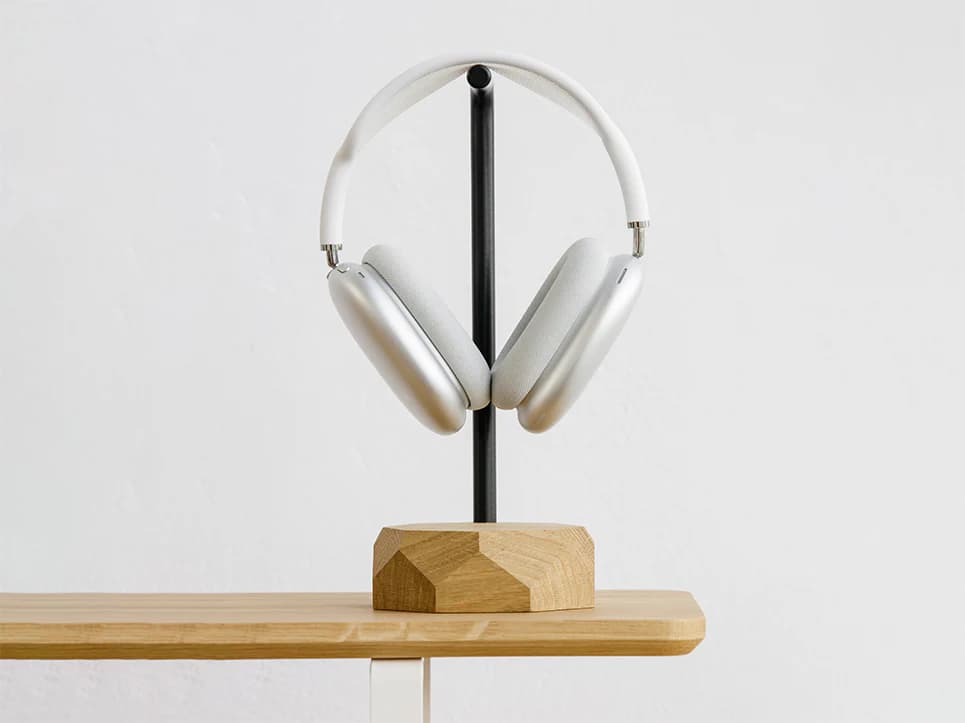
Decorative wood or metal stand – “The Design Piece”
When your audio equipment is part of your interior design, a sculptural stand can serve dual purposes. Premium hardwoods like walnut or mahogany are finished with a clear coat that shows grain while protecting against wear. Metal options may feature brushed brass or matte black with artistic cut‑outs. These stands often have a wider base for extra stability and may include a subtle cable channel hidden within the design. Expect a higher price tag, but the visual impact can elevate the entire listening environment.
Why it suits you: Audiophiles who treat gear as art, living‑room setups meant for entertaining, or anyone looking to make a statement with headphone storage.
Shop this type: Check price on Amazon →
How to choose
- Measure the space – Record both desk width and floor area if you’re eyeing a column. Include room for any extra shelves you might need.
- Check headphone weight – Most review sites list it; match the heaviest pair you own against the stand’s maximum load.
- Define required features – Do you need cable clips, a USB hub, or a shelf for a DAC? List the must‑haves and the nice‑to‑haves.
- Match material to usage – Aluminum for rugged daily use, wood for aesthetics, acrylic for a lightweight look.
- Test stability – If possible, give the stand a gentle nudge before buying; a solid stand will not wobble.
- Align style with décor – Choose a finish that either blends seamlessly with your desk or stands out as a decorative accent.
- Set a budget – Once you’ve narrowed material, capacity, and features, price points become clear. Remember that a $30 aluminum post can outperform a $70 plastic one, while a $120 sculptural piece adds visual value.
By following these steps you’ll quickly eliminate unsuitable options and land on a stand that protects your headphones and complements your space.
FAQ
How much weight can a typical headphone stand hold?
Most aluminum or steel posts rate for 350–450 g, covering the majority of consumer and audiophile headphones. Heavy‑duty floor columns and racks often support 600 g or more, but always verify the manufacturer’s capacity.
Will a stand affect the sound quality of my headphones?
The stand itself doesn’t change acoustic performance, but a stable platform reduces vibrations that could travel through the headband. Wood finishes may dampen minute resonances, which some audiophiles find beneficial.
Do I need a stand if I only use my headphones at night?
Even occasional use benefits from a dedicated resting spot. It prevents accidental drops, protects the headband from crushing, and keeps your nightstand tidy.
Can I use a headphone stand for earbuds or in‑ear monitors?
Most stands are designed for over‑ear headphones with a headband. Some compact tops can hold a single earbud case, but it’s not the intended use and may feel insecure.
Are cable clips really necessary?
Cable management isn’t mandatory, but clips keep cords from snagging, reduce wear, and maintain the clean aesthetic many audiophiles prefer.
How do I clean a headphone stand?
For metal or acrylic, use a soft cloth with mild soap and water. Wood finishes benefit from a dry microfiber cloth; avoid soaking or harsh chemicals that could damage the finish.
Bottom line
Choosing the right headphone stand is about matching material, capacity, footprint and style to your listening space and habits. A compact desktop post keeps a small desk organized, a heavy‑duty floor column offers rock‑solid stability for heavyweight models, a multi‑device rack consolidates gear, and a decorative wood or metal stand adds visual flair. By weighing footprint, weight capacity, cable management, and aesthetics, you’ll protect your headphones and elevate the look of your high‑fidelity setup. Happy listening!